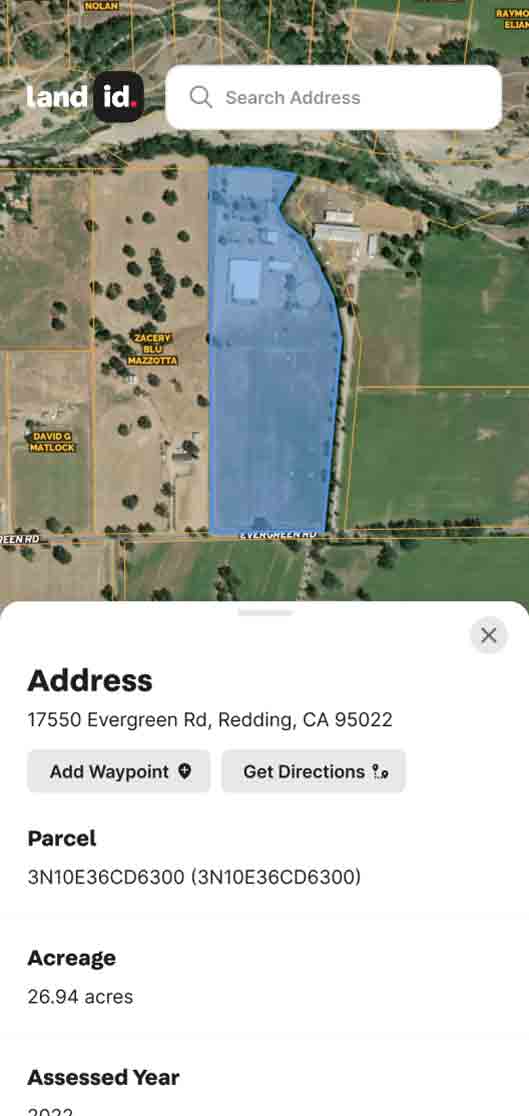



Three minutes from now, your next listing could have a virtual outdoor tour that walks buyers through every acre—without you saying a word.
That's Land id’s newest feature, Property Tour, a first-of-kind property slideshow that lets buyers explore the land on their own, from their own device, on their schedule, without needing a guide (or tech support from an agent).
You pick the property, Land id auto-generates the tour, and you share a link. Clients get a polished, slide-by-slide view of the property with real property data: 3D terrain, water features, soil data, boundaries, photos, and more.
The tour does the work you don't have time to do. And it looks like you spent all day on it.
What Is the Land id Property Tour?

Land id’s Property Tour feature is a new way to showcase any property using the maps, data, and media already in Land id—organized into clean, easy-to-navigate slides that any viewer can click through on their own, like a slideshow.
When you create a virtual tour, Land id auto-generates slides directly from the various datasets available within Land id. This includes:
- A showcase rotating 3D map, which works like a 360° virtual tour of the land
- Property boundaries
- Property details
- Thematic data slides covering essentials like water features, floodplain, local public lands, schools, and select utilities
Upload videos, images, and/or Matterport tours if you have them. Reorder slides, hide the ones that don't apply, and have a shareable property tour link in minutes. It's intuitive and fast, with no manual assembly or design skills needed.
Buyers open the link on any device (desktop, tablet, or phone) and explore the land virtually, at their own pace, without needing to install the Land id app.
Virtual tours are mobile-responsive and built to be shared:
- Via email or text
- Embedded directly on your listing page
- Linked via the MLS virtual tour URL field
Who This Is For
Property Tour is for real estate agents and property professionals who want every listing to make a strong first impression, regardless of property type.
- Listing agents who want to stand out at every price point, from suburban acreage to sprawling ranch.
- Land-focused agents selling complex properties where the story goes beyond square footage.
- Agents working with out-of-town or remote buyers who can't walk the land in person.
- Brokerages that want to equip agents with easy-to-use, high-quality marketing assets.
Property Tour is available now for Pro and Pro Unlimited subscribers on the web.
Key Benefits of Land id's Property Tour
Land id's Property Tour allows you to create immersive, intuitive experiences that can be easily shared across platforms, boosting viewer engagement, increasing client understanding, and making marketing efforts easier.
Create a Marketing Centerpiece in a Few Minutes, Not Hours
Real estate agents and marketing teams don't have time to build elaborate presentations for every listing. Property Tour handles the heavy lifting for you. Pull up a property, click to instantly generate a virtual tour, and Land id automatically assembles the slideshow from the data associated with that property.
Instead of hours of manual work creating unique marketing assets, you can go from a property search to a client-ready marketing asset in about three minutes. While other agents spend countless hours and dollars on custom listing materials—or skip the presentation altogether—you've already created and shared a link to a stunning virtual tour.
High-End Presentation, No Design Skills Required
The tour looks premium because it is. Clean interface, polished slides, smooth navigation—the kind of presentation that reflects well on you before a buyer has read a single word. No more 2D Google Map screenshots or pins dropped on a flat map without context.
Share your virtual tour as a link, embed it on your website, or drop it into your next listing email. The property’s full story is no longer buried in a wall of text or a map stuck in a sidebar.
Save Time With Pre-Qualified Buyers
A buyer who truly understands a property moves faster, asks better questions, and wastes less time. Property Tour helps you pre-qualify buyers faster.
The individual tour slides invite clients to engage with the data, simplify complex property information, and walk buyers through the property story in order: what they're looking at, what the data means, and why this listing is worth their time—or not. That’s a faster match between potential buyers and best-fit properties.
Finally, a Virtual Walkthrough for the Outdoors
Virtual indoor home tours changed buyer expectations for residential listings. Buyers got used to exploring a home independently before committing to a visit.
Outdoor terrain and acreage listings have never had that. Buyers either had to trust static photos, imagine terrain from aerial images, interpret a map they may not know how to read, or travel for a showing.
Property Tour finally delivers 24/7, self-guided, visually rich experiences that give buyers a feel for the property before they ever set foot on it, in a user-friendly, organized virtual tour—so the property can speak for itself.
You can even add your Matterport links to provide an indoor and outdoor virtual tour all in one place, providing a full understanding of the property.
Elevates Any Property
It's tempting to think of this as a tool just for land and ranch listings. It isn't.
Property Tour is great for creating virtual tours where the land or its surroundings are part of the story, whether an amenity-rich suburban site, rural transitional parcel, commercial land, or a recreational tract.
If a buyer needs more than a photo to understand a property's true potential, you need a Property Tour. It instantly elevates any property.
What's Inside a Land id Property Tour
Property Tour is a feature within Land id. It's a virtual tour creator consisting of slides that guide buyers through the property in a compelling, logical order. You have full control to add, rearrange, or remove slides to best tell the property's story.
By default, every high-quality virtual tour includes:
- 3D Tour—The life-like topographic experience. Buyers get a feel for elevation, terrain, and orientation that no flat map can convey.
- Property Map—Not just a Google street view. An interactive look at the property itself: boundaries, features, and relevant data layers.
- Area View—Zoomed out for context: proximity to towns, highways, conservation easements, and surrounding landmarks.
- Thematic Slides—Water features, utilities, schools, and other property data overlays, pre-loaded so you don't have to sift through data and viewers don't have to toggle anything themselves.
- Description and Branding—Property description and direct contact options: call, email, and a link straight to the listing page.
Optionally, you can upload photos and videos, pin-drop them on the property, and include a gallery slide to tell an immersive story.
You control which slides appear and in what order with a drag-and-drop interface. If a slide isn't relevant to a specific property, just turn it off. Easily share as-is or customize for your specific listing.
How It Works: From Property Search to Shareable Tour in Under 3 Minutes
Creating a virtual tour involves just a few easy steps:
- Search for a property in Land id.
- Click "Create Property Tour."
- Review and customize your slides—reorder, enable, or disable as needed.
- Publish your tour.
- Share the link or embed it directly on your listing page.
That's it! You can even create Property Tours from existing Land id maps. For a detailed feature walkthrough, read our Help Center article or watch this three-minute video tutorial.
Get Started With Land id's Property Tour
Property Tour is available now for Land id Pro and Pro Unlimited subscribers on the web. Open any property card and start building your own virtual tour—no special setup required.
Create your first Property Tour now!
Not on Pro yet? Start a free trial or sign in to upgrade your plan.
FAQs
Can I create a Property Tour out of an existing map?
What devices can recipients use to view the Property Tour?
Can I customize which slides appear in my virtual tour?
I’m a Land id Pro user. Does a published tour count against my map limit?
Can I embed a tour on my website or share it via MLS?
Is Property Tour available in the Land id mobile app?
Do I need special software or equipment to create a Property Tour?
Continue Reading
Feature Drops: Contact Information, AI Insights, CarPlay on All Plans & More

By Land id
From contact info to AI-powered property insights to more tools on mobile, here's what's new in Land id—and how these updates make your work easier.
The Different Types of Easements & How They Work
By Land id
Learn the definition of an easement, the different types of easements in real estate, how they affect property rights and value, and how to check for easements before buying property.


Explore Private Parcel Data & Property Boundaries
Download the Land id app and try for free.